Le produit
Un point d’accès professionnel, fait pour s’accrocher au truss.
AirTruss habille le meilleur Wi-Fi du marché d’un boîtier étanche, d’une accroche truss et d’une alimentation intégrée — pour hisser votre réseau au-dessus de la foule comme un projecteur et piloter tout l’événement depuis une seule page. Livré assemblé, testé, prêt à accrocher.
Trois points d’accès sur la même accroche, d’une salle corporate à la fosse d’un festival — en location ou à l’achat.
Comment ça marche
Un Core, et les kits que vous accrochez.
Chaque installation AirTruss, c’est deux choses : un Core en régie, et les kits que vous accrochez en l’air. Le Core est le cerveau — il transforme un seul uplink en réseau de show piloté, et chaque kit lui répond. Les kits, c’est la couverture. C’est pourquoi une installation, c’est toujours un Core plus les kits qu’il faut à la salle.
Votre uplink
Venue fibre · 4G/5G · Starlink
Bascule auto en cas de coupure
Le Core
Votre régie, dans le rack
Les kits
Accrochés au truss · 1 à 6+
Un uplink arrive dans le Core ; ajoutez des kits jusqu’à couvrir la salle. Si cet uplink tombe, le Core bascule tout seul sur un secours 4G/5G ou Starlink — le portail montre la bascule en direct.
Accrochez les kits
Accrochez chaque kit au truss comme un projecteur — une goupille captive, à l’horizontale ou à la verticale. Une prise 230 V à proximité l’alimente. Rien à configurer en l’air.
Un câble dans le Core
Le Core est dans votre rack, en régie. L’uplink du site y entre, et tous les kits y remontent — un seul Core fait tourner tout le show.
Tapez le numéro de série
Le Core apparaît dans le portail Fleet grâce à son numéro de série gravé. Vous pilotez le réseau, les mots de passe par équipe, le Mode Show et le rapport depuis une seule page — jamais une interface réseau.
Il vous faut toujours un Core. Les kits sont des points d’accès — ils ne font pas tourner un show tout seuls ; ils répondent au Core, qui porte la passerelle, le portail et tous les garde-fous. C’est pourquoi chaque pack de location et chaque achat commence par un Core, puis ajoute des kits.
Les points d’accès
Trois points d’accès.
Un boîtier, un Core, une accroche.
Nous ne réinventons pas le matériel. AirTruss est bâti sur Ubiquiti UniFi — un Wi-Fi sérieux et mondialement reconnu que n’importe quel technicien connaît déjà. Vous choisissez le point d’accès qu’il faut pour la salle ; le même boîtier, le même Core et la même accroche portent les trois. Une seule accroche, toute la gamme.
| Référence AirTruss One Mesh | Plus de débit AirTruss One Flow | Densité AirTruss One Crowd | |
|---|---|---|---|
| Norme / bandes | Wi-Fi 6 · 2.4 + 5 GHz | Wi-Fi 7 · 2.4 + 5 GHz | Wi-Fi 7 · 5 + 6 GHz, 12 flux |
| Indice de protection | IP66/67 | IP66/67 | IP66/67 |
| Couverture | ~185 m², omni 360° | jusqu’à 465 m², directionnel 45° | 465+ m², sélectionnable 50°/90° |
| Clients simultanés | 300+ | 250+ | 1,500+ |
| Uplink / alim | GbE · PoE ou 230 V | 2.5 GbE · PoE+ | 10 GbE · PoE++ |
| Déploiement | Le plus souple : PoE, 230 V, ou les deux — le maillage ne demande aucun câble réseau | Câble réseau requis (secteur optionnel) | Câble réseau + 230 V au boîtier (requis) |
| Idéal pour | Tournée, montage express, zones sans câble | Scène/parvis câblés, plus de débit | Fosse, tribunes, chapiteau — la foule |
Trois façons de connecter — souplesse maximale
Les kits Mesh et Flow se contentent de ce que la position offre et choisissent la source active tout seuls — les trois voyants indiquent laquelle, rien à décider au montage. Le modèle Crowd fait exception : c’est le plus costaud, et il réclame plus de puissance qu’un câble réseau ne peut en fournir, il lui faut donc toujours une prise 230 V à sa position.
PoE seul
Un seul câble réseau porte l’alim et les données. Aucun secteur nécessaire à la position.
230 V seul
Juste une prise secteur à proximité — avec le modèle Mesh, les données passent par le maillage sans fil, donc aucun câble réseau.
Les deux — redondant
PoE et secteur ensemble : débranchez une source en plein show, le Wi-Fi ne coupe jamais.
Comment on dimensionne — la vraie règle
En foule, on dimensionne au nombre d’appareils, pas à la surface : comptez à peu près un kit Mesh ou Flow pour 150–200 appareils simultanés, et un kit Crowd pour ~1 000 en fosse ou en tribune, son faisceau visant précisément le public. Le portail Fleet montre la charge réelle par kit — vous ajoutez un kit quand l’orange apparaît, pas quand une brochure le dit.
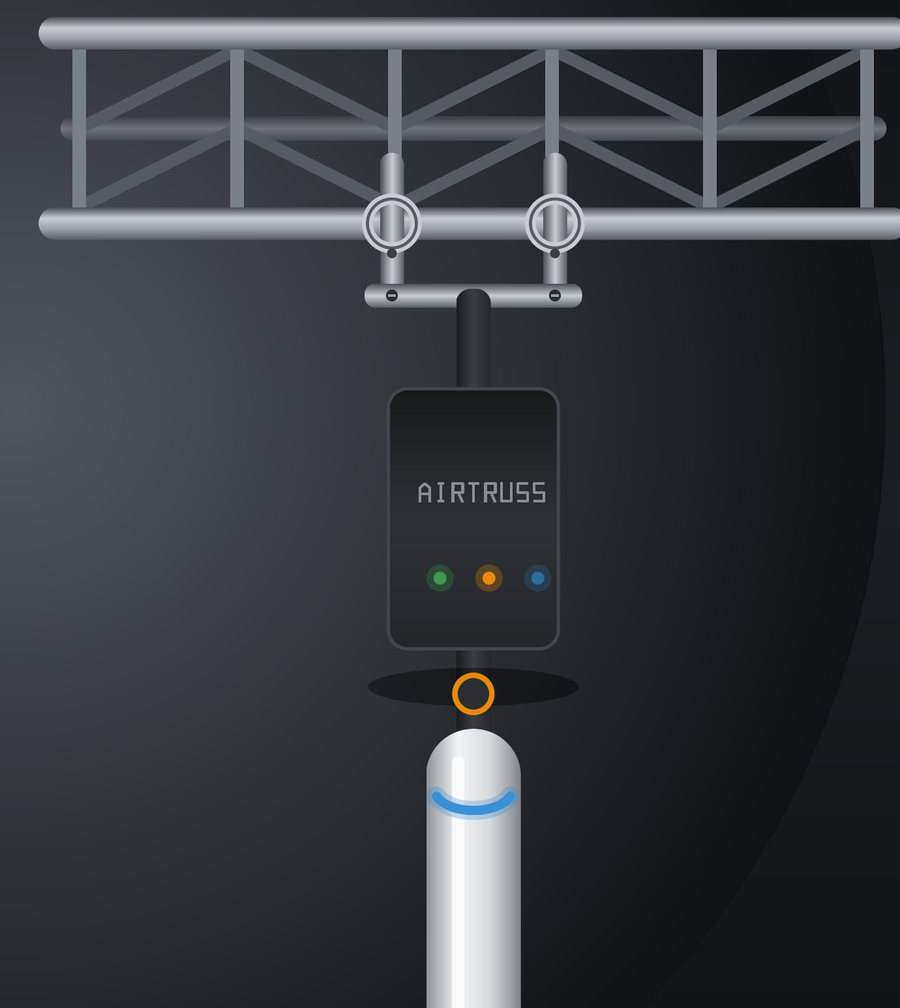
Un kit, accroché comme un projecteur.
Serrez-le sur un montant ou suspendez-le sous une traverse — à la verticale ou à l’horizontale, une seule goupille captive, environ 15 secondes montre en main.
Ensuite, chaînez les kits les uns aux autres — réseau et alimentation sont repiqués d’un kit à l’autre, si bien qu’un seul câble dessert le point d’accès suivant le long du truss. Une seule ligne à tirer, et la couverture court jusqu’au bout de la structure.
AirTruss One
Extérieur · IP66/67La brique de base : un point d’accès UniFi, un boîtier extérieur IP66/67 avec l’injecteur d’alim intégré, et une accroche mécanique étudiée pour le truss — élingue de sécurité, capuchons de connecteurs et notice au couvercle inclus. Chaque kit est fait pour l’extérieur, quel que soit le point d’accès choisi — même boîtier, même accroche.
Dans la boîte
- Point d’accès UniFi (Mesh / Flow / Crowd)
- Boîtier étanche, injecteur d’alim intégré
- Accroche truss H/V, une goupille captive
- Élingue de sécurité captive + capuchons
- Notice rapide au couvercle
Accroche
- Conversion
- Horizontal ↔ vertical en une goupille captive — environ 15 secondes
- Une accroche, tout point d’accès
- Le même boîtier et la même accroche portent Mesh, Flow ou Crowd — on change juste la borne
- Accrochage
- Crochets papillon standard 48–51 + élingue de sécurité captive
Alimentation
- Injecteur intégré
- Un injecteur 60 W est intégré au boîtier — une simple prise 230 V alimente n’importe quel AP, partout
- Sources
- PoE seul, 230 V seul, ou les deux — sélection automatique, rien à régler
- État
- 3 voyants: PoE upstream / 230 V / AP
- One Crowd
- 230 V au boîtier requis pour le point d’accès le plus dense
Boîtier & connecteurs
- Boîtier
- Polycarbonate étanche, IP66/IP67, classe II
- Face
- 6× Neutrik D24 + 3 voyants
- Connecteurs
- etherCON uplink & network out, powerCON TRUE1, 16 A loop-through
Fait pour la tournée
- Finition
- Aluminium thermolaqué noir mat RAL 9005
- Visserie
- Inox partout — anti-corrosion
- Étanchéité
- Connecteurs etherCON et TRUE1 verrouillés et capuchonnés — pluie, poussière, route
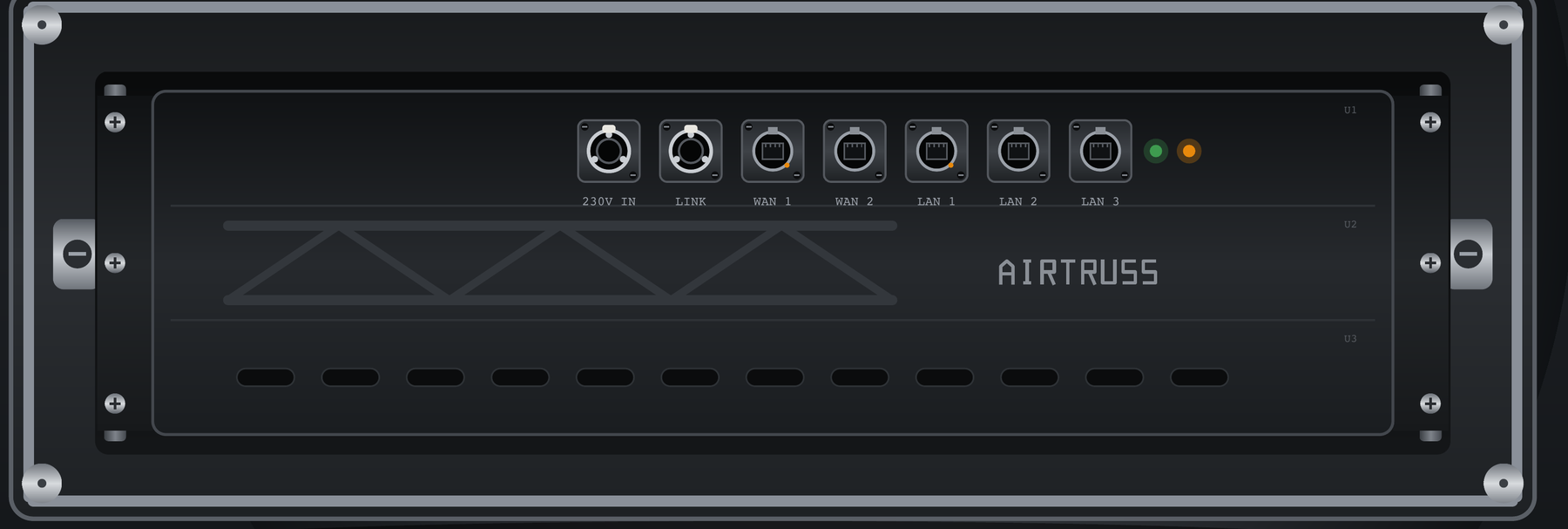
AirTruss Core Rack
Requis · un par installationLe cerveau de chaque installation AirTruss : un flight 3U qui prend place en régie et transforme un seul uplink en réseau de show complet. Les kits s’accrochent, le Core les pilote. La passerelle est cachée derrière une face tout Neutrik ; et comme l’alimentation est désormais logée dans chaque boîtier d’AP, le Core ne transporte que de la data — tous les LAN en direct, rien à configurer. Contrairement aux kits, il n’est pas étanche : il reste dans votre rack, du côté sec du show.
Voir les packs de locationChâssis
- Cadre
- Flight de tournée 3U, à papillons à ressort — prêt pour la route
- Face
- Face tout Neutrik (7× D24) — brassez comme n’importe quel rack
Passerelle
- Cachée
- Une passerelle UniFi, entièrement cachée derrière la face — rien à paramétrer
Data, pur
- Aucune alim
- L’alimentation est dans chaque boîtier d’AP — le Core ne transporte que de la data
- Ports
- All LAN direct; LAN 3 = 2.5 G
- Un câble
- Uplink entrant, et le réseau est actif
Au-delà du Wi-Fi
Fait tourner les réseaux de votre show — honnêtement.
Un réseau d’événement ne transporte pas « de l’internet » — il transporte des métiers. AirTruss fait tourner la conduite lumière, les tablettes de mixage et l’AV-over-IP sur un seul réseau piloté, chacun isolé dans sa propre voie. Et il est honnête sur ce qui va sur le Wi-Fi et ce qui reste filaire.
Lumière — Art-Net / sACN
Pupitres de conduite et éclairage architectural passent sur le réseau ; la conduite principale et son secours restent filaires, via le NET OUT du kit, là où le show ne peut pas se permettre la moindre coupure.
Consoles & contrôle
Tablettes de mixage sur une voie 5 GHz dédiée et isolée, canal verrouillé — la raison n° 1 des appels des équipes son. Votre console mérite mieux que le Wi-Fi du lieu.
AV over IP — NDI, AES67
Passent sur le LAN filaire 2,5 G du Core dans leur propre VLAN, isolés du réseau invités : une salle pleine ne les touche jamais.
La règle honnête : le Dante ne passe jamais en Wi-Fi. Son horloge ne le tolère pas — et on le dit d’emblée, avant que vous n’essayiez. Le LAN filaire du Core porte quand même un VLAN Dante de secours, totalement isolé. Une réponse franche vaut mieux qu’une réponse optimiste une fois la salle pleine.
AirTruss Live · location
Louez-le comme un projecteur.
Le réseau arrive dans un flight, s’accroche comme un projecteur, et s’active en tapant son numéro de série. Le portail Fleet est inclus, et il expire au retour du matériel. Les flightcases sont compris dans chaque pack ; les tarifs s’entendent hors TVA et hors livraison.
SOLO
1 Core + 2 kits
Tarif 1 jour — remises multi-jours ci-dessous
Vérifier la disponibilitéSCÈNE
1 Core + 4 kits
Tarif 1 jour — remises multi-jours ci-dessous
Vérifier la disponibilitéFESTIVAL
1 Core + 6 kits + 1 de secours
Tarif 1 jour — remises multi-jours ci-dessous
Vérifier la disponibilitéMulti-jours — coefficients de location standard
| Jours | 1 | 2 | 3 | 4 | 5 | 7 | 10 | 14 | 30 |
| × | 1.0 | 1.5 | 2.0 | 2.8 | 3.3 | 4.0 | 5.0 | 6.0 | 9.8 |
Ex. SCÈNE sur un festival de 3 jours = 349 × 2 = 698 € · FESTIVAL sur une semaine = 459 × 4 = 1 836 €. Un week-end ven→lun compte pour 2 jours (×1,5).
Suppléments de version : One Flow +10 €/jour par kit, One Crowd +75 €/jour par borne (elle en remplace trois en densité). Panachez librement — le grand classique étant un pack scène Mesh avec un Crowd au-dessus de la fosse.
Internet de secours
- 4G/5G dans le Core, SIM 50 Go, bascule auto+39 €/jour
- Starlink autonome (site sans internet)+79 €/jour
Services
- Montage & démontage (Bruxelles +50 km)290 €
- Régisseur réseau à distance pendant le show120 €/événement
- Kit supplémentaire, à la carte90 €/jour
À l’achat
Plutôt acheter ? Le calcul est vite fait.
Le marché paie déjà 1 200–1 800 € un switch de tournée sans point d’accès ni accroche. AirTruss se place juste au-dessus — point d’accès et accroche compris — et pour un loueur, un kit s’amortit en environ 22 jours loués.
| Article | Prix (HT & hors livraison) | Note |
|---|---|---|
| AirTruss One — Mesh | 2,190 € | Le kit complet : point d’accès, boîtier, accroche H/V |
| AirTruss One — Flow | 2,290 € | Wi-Fi 7, uplink 2,5 GbE |
| AirTruss One — Crowd | 4,590 € | Densité Wi-Fi 7 ; 230 V au boîtier requis |
| AirTruss Core Rack | 1,690 € | Passerelle cachée, face tout Neutrik, data pur |
| Platine d’interface AP | 49 € | Interchangeable — Mesh / Flow / Crowd |
| Flight de transport (2 / 6 kits) | 390 € / 790 € | Mousse CNC, une alvéole par kit |
Tous les prix s’entendent hors TVA et hors livraison.
Licence portail Fleet
390 €/an par Core · année 1 incluseGo/No-Go, Mode Show, PPSK par équipe, rapports à vos couleurs, mises à jour et API. Sans licence active, le matériel continue de fonctionner — on ne prend jamais un réseau en otage ; vous perdez seulement le portail et les mises à jour poussées.
Parlez à un vrai humain
Quand ça sonne, un humain décroche.
Notre métier vit la nuit et le week-end ; les tickets et les chatbots, non. Sur un événement déclaré, quelqu’un qui fait vraiment de l’événementiel décroche — quelqu’un qui sait ce qu’est un Mode Show en plein show, une fiche de coordination HF et un hotspot sauvage du catering.
Événement déclaré
Rappel < 15 min
Ligne directe + WhatsApp pro
Hors événement
< 4 h ouvrées
Mêmes canaux
Base
Jour ouvré suivant
E-mail / portail
Parlez-nous de votre événement.
Choisissez une date, choisissez un pack, et on amène le réseau dans un flight — ou on accroche un kit de démo devant vous en 90 secondes.